

Automation deployment is widely misunderstood as a tool for moving code faster. In reality, it is a foundational layer of scalable, error-resistant business operations. Many organizations treat it as a developer convenience when it is actually a strategic infrastructure decision that affects release quality, team velocity, and system reliability. Deployment automation refers to using software to move code changes automatically across environments, from development to testing to production, eliminating manual releases. This guide breaks down what automation deployment really means, how it works inside modern pipelines, and what strategies and pitfalls every technology leader should know before scaling.
Table of Contents
- Defining automation deployment and its role in business operations
- How automation deployment works: Process and architecture explained
- Best practices and expert insights for scalable deployment
- Choosing the right automation deployment strategy for your organization
- Our perspective: Lessons learned from automation deployment in the real world
- Accelerate your automation journey with Starks Global Group
- Frequently asked questions
Key Takeaways
| Point | Details |
|---|---|
| Automation deployment defined | It is the process of using tools to move code automatically between environments and cut out manual steps. |
| Critical for CI/CD | Automation deployment underpins modern Continuous Integration and Delivery, ensuring fast, reliable releases. |
| Flexibility in strategies | Organizations should choose deployment strategies based on need and scale, not just follow industry trends. |
| Governance and monitoring | Effective automation deployment requires strong monitoring, rollback plans, and a governance mindset. |
Defining automation deployment and its role in business operations
At its core, automation deployment means replacing manual release processes with software-driven pipelines that move code reliably and consistently across environments. According to Atlassian's framework, automation deployment uses software tools and systems to automatically move code changes from development to testing, staging, and production, eliminating the risk and inconsistency of manual releases.
This matters far beyond engineering teams. When a business can release software updates in hours instead of weeks, it gains a measurable competitive edge. Errors that once slipped through manual handoffs are caught automatically. Teams stop firefighting and start iterating. That shift has direct business value.
Automation deployment sits at the center of what is known as a CI/CD pipeline. CI stands for Continuous Integration, the practice of merging code changes frequently. CD stands for Continuous Deployment or Continuous Delivery, the practice of releasing those changes automatically or with minimal human intervention. Together, they form the backbone of modern automation infrastructure.
Here is what automation deployment delivers when implemented correctly:
- Error reduction: Automated checks catch issues before they reach production.
- Faster iteration: Teams can release multiple times per day instead of once per sprint.
- Consistency: Every deployment follows the same validated steps, every time.
- Business agility: Faster releases mean faster response to customer needs and market shifts.
- Audit trails: Automated pipelines log every action, making compliance and debugging far simpler.
At a high level, an automated deployment process follows a structured sequence: code is written and committed, a pipeline is triggered, automated tests run, the build is packaged, and the release is pushed to the target environment. Each step is defined, repeatable, and verifiable.
"The real value of automation deployment is not speed alone. It is the elimination of variability. Every manual step is a potential failure point. Remove the human from the release loop and you remove the most unpredictable variable in your system."
Pro Tip: If your team still relies on manual checklists before any deployment, that is your first automation target. Structured pre-deployment validation scripts can replace those checklists entirely and run in seconds.
How automation deployment works: Process and architecture explained
Understanding how automation deployment operates at a structural level helps leaders make smarter infrastructure decisions. The pipeline is not a single tool. It is an architecture made up of connected components, each with a defined role.
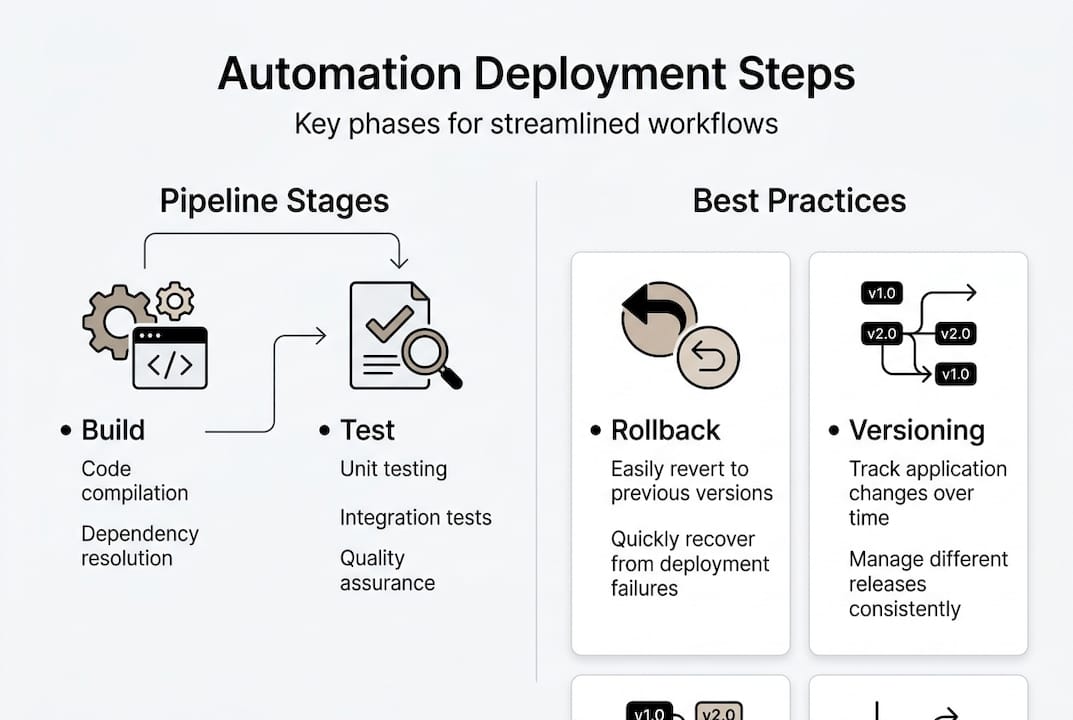
A standard automated deployment pipeline moves through these stages:
- Build: Source code is compiled or assembled into a deployable artifact.
- Test: Automated tests, including unit, integration, and security scans, validate the build.
- Package: The tested artifact is bundled and stored, often in a container registry or artifact repository.
- Deploy: The packaged artifact is pushed to the target environment using deployment scripts or orchestration tools.
- Verify: Post-deployment checks confirm the release is healthy before traffic is fully routed.
These stages are triggered by events like code commits or merge approvals, making the pipeline event-driven and responsive without requiring manual initiation.
The architecture supporting this pipeline typically includes several core components:
| Component | Role |
|---|---|
| Automation server | Orchestrates pipeline execution (e.g., Jenkins, GitHub Actions) |
| Deployment scripts | Define environment-specific release steps |
| Container orchestration | Manages runtime environments (e.g., Kubernetes) |
| Artifact repository | Stores versioned build outputs |
| Monitoring layer | Validates deployment health post-release |
Each layer must be configured to communicate reliably with the next. A misconfigured handoff between the test and package stage, for example, can silently break the entire pipeline without triggering an alert.

Pro Tip: Treat your pipeline configuration as code. Store it in version control alongside your application code. This makes pipeline changes auditable, reversible, and testable, which is exactly how you approach automating code deployment at scale.
The CI/CD model enables teams to release software continuously without manual coordination. When the pipeline is well-architected, a developer's commit on a Monday morning can be live in production by Monday afternoon, fully tested and validated.
Best practices and expert insights for scalable deployment
Scalable deployment is not just about running a pipeline faster. It is about building a system that stays reliable as team size, codebase complexity, and traffic volume grow. Expert operators approach this differently than teams just getting started.
Here are the practices that separate high-performing deployment systems from fragile ones:
- Immutable infrastructure: Never modify a running server. Replace it. This eliminates configuration drift and makes rollbacks predictable.
- Automated rollback triggers: If post-deployment monitoring detects anomalies, the system should roll back automatically without waiting for human intervention.
- Progressive traffic shifting: Route a small percentage of traffic to the new release first. Validate. Then expand.
- Production-like pre-production testing: Test environments that do not mirror production load and configuration will miss the failures that matter most.
Experts recommend using immutable infrastructure and rollback triggers alongside progressive traffic shifting and comprehensive pre-production testing to reduce deployment risk at scale.
The three most widely used progressive deployment strategies each serve a different risk profile:
| Strategy | How it works | Best for |
|---|---|---|
| Blue/green | Two identical environments; switch traffic instantly | Zero-downtime, high-stakes releases |
| Canary | Gradual rollout to a subset of users | Risk-sensitive feature releases |
| Rolling | Incremental replacement of instances | Balanced risk and simplicity |
Governance and observability are non-negotiable at scale. Deployment automation enhances efficiency but requires governance, monitoring, and iterative deployment to avoid over-engineering or hidden manual steps. Without structured oversight, pipelines accumulate undocumented exceptions that become single points of failure.
"The teams that scale deployment successfully are not the ones with the most tools. They are the ones with the clearest feedback loops. They know within minutes whether a deployment succeeded or introduced a regression."
The most overlooked pitfall is hidden manual steps. These are informal handoffs, Slack messages, or verbal approvals that exist outside the documented pipeline. They create inconsistency and erode the reliability that automation is supposed to guarantee. Audit your pipeline for these regularly. Explore advanced automation strategies to systematically eliminate them.
Choosing the right automation deployment strategy for your organization
Selecting a deployment strategy is not a purely technical decision. It reflects your organization's risk tolerance, team experience, infrastructure maturity, and the criticality of the applications you are deploying.
Before choosing a strategy, evaluate these factors:
- Application criticality: A payment processing service demands zero-downtime deployment. An internal reporting tool may tolerate brief interruptions.
- Team experience: Advanced strategies like canary deployments require monitoring expertise and clear success metrics.
- Infrastructure capability: Blue/green deployments require running two full environments simultaneously, which has real cost implications.
- Release frequency: Teams releasing dozens of times per day need pipelines optimized for speed. Teams releasing monthly prioritize stability.
While zero-downtime strategies minimize risk, they increase complexity. Some experts advocate starting with simple rolling deployments for low-risk applications before advancing to more sophisticated patterns.
This is sound advice. The temptation to implement blue/green deployments from day one is real, especially after reading about their benefits. But if your team does not yet have robust monitoring and automated rollback in place, a blue/green setup can give you false confidence. You have two environments, but no reliable way to know which one is actually healthy.
Pro Tip: Map your applications by criticality and release frequency. High-criticality, high-frequency apps justify the investment in canary or blue/green strategies. Low-criticality, infrequent releases are better served by rolling deployments with solid test coverage. Use this mapping as your deployment strategy guide when prioritizing automation investments.
Start simple. Validate. Then layer in complexity only where the data justifies it. This is how scalable deployment architectures are built without accumulating technical debt in the pipeline itself.
Our perspective: Lessons learned from automation deployment in the real world
We have evaluated and deployed automation architectures across a wide range of organizational contexts. The pattern we see most often is not teams that automate too little. It is teams that automate too much, too fast, and end up with brittle pipelines they cannot debug or trust.
Over-automation creates blind spots. When every step is abstracted behind tooling, teams lose the operational knowledge to intervene when something breaks. The pipeline becomes a black box. That is a risk, not an advantage.
The most reliable deployments we have seen share one characteristic: incrementalism. Deploy small changes frequently. Build feedback loops that surface failures within minutes. Treat rollback as a first-class feature, not an afterthought.
The most overlooked challenge is not the tooling. It is building the organizational discipline to act on what the monitoring tells you. Alerts without response protocols are noise. Rollback capability without practiced runbooks is theoretical.
Customizing off-the-shelf tools to fit complex edge cases almost always costs more than starting with a simpler, well-understood approach. We have seen teams spend months building custom orchestration layers that a standard tool would have handled in days. Review real-world deployment outcomes before committing to a custom build.
Deploy small. Validate fast. Automate the feedback before you automate the release.
Accelerate your automation journey with Starks Global Group
If the strategies covered in this guide resonate with where your organization needs to go, Starks Global Group provides the infrastructure to get there with confidence.
Our platform is built around verified, tested automation architectures that cover the full deployment lifecycle, from pipeline design to post-deployment observability. We do not recommend tools we have not validated ourselves. Every blueprint we publish reflects real deployment logic, not theory. Whether you are structuring your first CI/CD pipeline or scaling an enterprise-grade system, explore automation solutions designed to match your operational requirements and grow with your business.
Frequently asked questions
What is automation deployment in simple terms?
Automation deployment means using software to automatically move updates or code from development to production, reducing manual work and errors. It eliminates manual releases by moving code changes across environments through a defined, repeatable pipeline.
How does automation deployment improve business efficiency?
Automation deployment speeds up software releases, minimizes mistakes, and allows organizations to adapt quickly to market changes. It enhances operational efficiency but requires governance and monitoring to deliver consistent results.
What are the main steps in an automation deployment pipeline?
The main steps are building, testing, packaging, and releasing the software, typically triggered by code changes or approvals. These stages form CI/CD pipeline components that run automatically without manual initiation at each step.
Which deployment strategies are best for small teams?
Small teams often start with rolling deployments for simplicity, moving to blue/green or canary as needs evolve. Zero-downtime strategies increase complexity, so starting simple and advancing incrementally is the recommended approach.