

Most business leaders assume that deploying automation means choosing a tool, connecting a few workflows, and watching efficiency climb. That assumption is the reason only 25% of AI projects actually deliver measurable ROI. Automation is not plug and play. It is a structured discipline with distinct layers, prioritization frameworks, and governance requirements. This guide breaks down what a real AI-driven automation system looks like, how to choose where to deploy it, and what separates the organizations that scale successfully from those that stall in pilot mode.
Table of Contents
- What is an automation system? Key components explained
- Choosing the right processes for automation
- Dealing with edge cases, exceptions, and failures
- Best practices for building reliable automation systems
- AI vs. rule-based automation: Strengths, weaknesses, and the hybrid future
- The uncomfortable truth: Why automation is a leadership discipline, not just a tech initiative
- Ready to build? Blueprint your automation journey with experts
- Frequently asked questions
Key Takeaways
| Point | Details |
|---|---|
| Layered architecture | Modern automation depends on four layers working together for reliable results. |
| ROI-focused selection | Target high-impact, high-volume, and error-prone processes first for automation. |
| Exception handling | Systems must be designed to handle edge cases and failures for true scalability. |
| Continuous improvement | Ongoing monitoring, validation, and human oversight keep automation robust long-term. |
| Leadership matters | Technology alone is not enough—organizational readiness drives automation success. |
What is an automation system? Key components explained
Modern AI-driven automation systems are not single tools. They are connected architectures built across multiple layers, each playing a specific role in delivering operational efficiency at scale. Think of it the way an engineer thinks about a building: you need a foundation, structure, utilities, and an occupant layer. Remove any one of them, and the whole structure becomes unreliable.
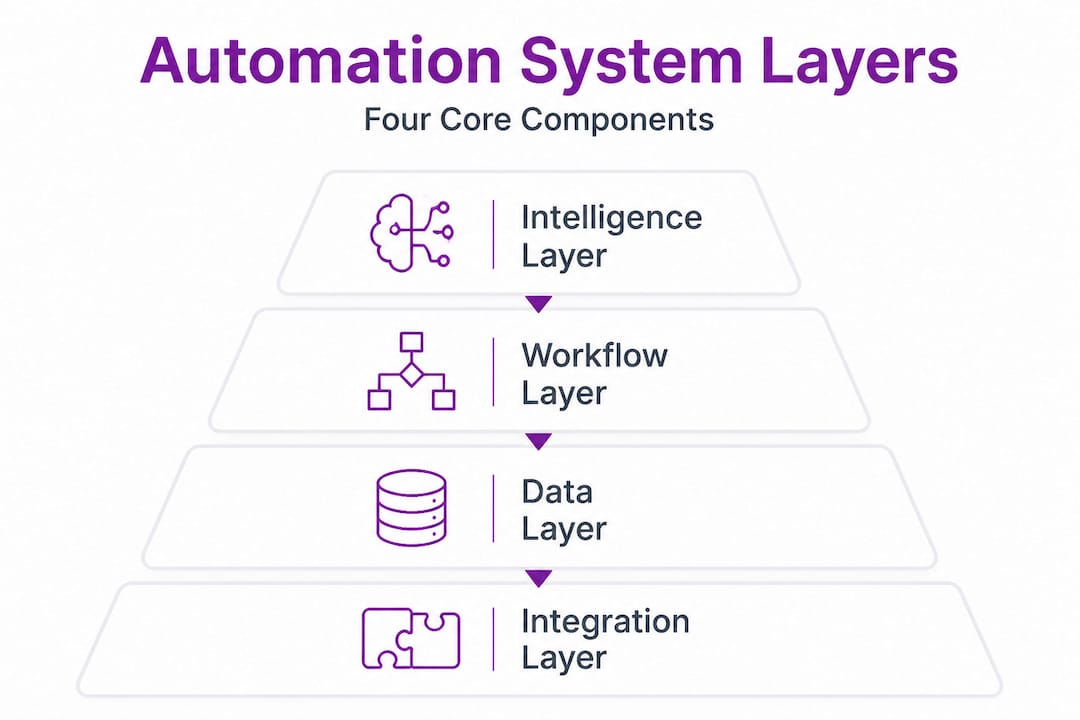
According to the xcessai AI automation playbook, AI-driven automation stacks include four core layers: the Intelligence Layer, the Workflow Layer, the Data Layer, and the Workforce Layer. Each one is distinct, and each one must be engineered deliberately.
| Layer | Core components | Primary function |
|---|---|---|
| Intelligence Layer | LLMs, AI agents, decision models | Reasoning, classification, prediction |
| Workflow Layer | RPA bots, triggers, orchestration engines | Executing and sequencing tasks |
| Data Layer | APIs, ERPs, databases, data pipelines | Moving and transforming data |
| Workforce Layer | Human reviewers, escalation paths, governance | Oversight, exceptions, accountability |
Here is what makes this four-layer model different from legacy RPA (Robotic Process Automation) alone:
- Legacy RPA executes rules on structured data. It follows scripts. When the script breaks or the input changes, it fails.
- AI-driven stacks introduce intelligence at the top layer, allowing the system to reason, adapt, and make judgment calls before the workflow executes.
- The Data Layer ensures decisions are made on clean, connected information rather than siloed inputs.
- The Workforce Layer keeps humans accountable for outcomes, not just outputs.
If you are exploring how these layers are assembled in practice, our automation infrastructure platform provides architecture references that show how verified tools are integrated into each layer. You can also browse ready-made designs through our system blueprints or find layer-specific tools through our automation tools marketplace. For a broader view of where AI fits across business functions, the AI career tools ecosystem offers useful reference points on where these capabilities are being applied today.
Choosing the right processes for automation
Once you understand the building blocks of automation systems, the next step is deciding where to focus your efforts for maximum results. This is where many organizations go wrong. They automate what is convenient rather than what is strategically valuable.

The xcessai automation playbook recommends prioritizing high-ROI processes using a criteria-based approach. A process qualifies as a strong automation candidate when it meets four or more of the following seven characteristics: it is repetitive, it is rules-based, it involves high transaction volume, it is error-prone under manual handling, it has clear inputs and outputs, it has a measurable outcome, and it does not require contextual human judgment to resolve exceptions.
Enterprise evaluation also demands more than accuracy checks. Multidimensional assessment should include cost modeling (cost variations across AI providers can reach 50x), latency requirements, reliability under repeated runs, and security and compliance exposure.
Here is how to approach process selection in sequence:
- Audit your current process inventory. List all recurring workflows across operations, finance, HR, and customer service. Categorize them by volume, frequency, and error rate.
- Score each process against the seven criteria. Any process scoring four or more is a primary automation candidate.
- Assess cost and latency impact. Processes with high transaction volume and real-time requirements need specific architecture decisions at the Workflow and Data layers.
- Start a 90-day pilot on your top-ranked process. Avoid automating across multiple departments at once. Pilots reduce risk and generate validation data.
- Scale to transformation in phases. After a successful pilot, replicate the architecture pattern into adjacent processes using the same layer stack.
Pro Tip: Avoid the "busywork trap." Many organizations automate low-stakes, low-frequency tasks because they are easy to script. This generates activity but not results. Focus your first automation investments on processes where an error costs real money or time.
Evaluating ROI accurately from the start protects your budget and your credibility with stakeholders. We document how we approach assessing automation ROI transparently so you can benchmark against real-world expectations.
Dealing with edge cases, exceptions, and failures
Prioritizing the right processes is crucial, but true resilience comes from knowing how to handle what goes wrong. In our experience reviewing automation architectures, the majority of system failures are not caused by the core workflow. They are caused by edge cases, meaning the inputs, conditions, and scenarios that fall outside what the original design anticipated.
Common automation edge cases include exceptions from unstructured data, scope drift, activation failures, sensor issues, and unexpected input formats. Here are concrete examples:
- A customer service automation receives a request written in an unexpected language or uses informal abbreviations the classifier was not trained on.
- An invoice processing bot encounters a PDF with a non-standard layout and fails to extract the correct line items.
- A data pipeline receives a field in a new format after an upstream system update and begins populating incorrect values silently.
- A workflow trigger misfires because an environmental condition changed (a file path was updated, an API endpoint was renamed).
"Rule-based systems fail on unstructured or variable inputs, while AI agents adapt better to novel conditions by reasoning rather than matching patterns." Atticusli
The 20% of edge case scenarios that fall outside the designed workflow typically consume 60 to 80% of your team's exception-handling time. That is the real operational cost of brittle automation. Designing for this reality from the start is what separates functional systems from frustrating ones.
What AI-driven approaches do differently in exception handling:
- They classify ambiguous inputs before routing them, rather than routing first and failing later.
- They use confidence thresholds to decide when a decision should escalate to a human reviewer.
- They log exception patterns, which means you can identify which edge cases are growing in frequency and update the model or rules accordingly.
- They treat failure as a data point, not just an error. Every unhandled exception becomes part of the training signal.
For further reference on how AI handles exceptions compared to manual coding approaches, AI for handling exceptions in application environments offers a useful technical perspective.
Pro Tip: Build an exception log from day one. Track every failure type, frequency, and resolution path. After 30 days, you will have a clear picture of which edge cases need workflow updates versus which ones need model retraining.
Best practices for building reliable automation systems
Understanding potential failures guides us to the concrete measures necessary for lasting automation success. Reliability is not a feature you add at the end of a deployment. It is an architectural decision made at the beginning.
Expert-validated practices for building systems that hold up over time include designing for failure with validation loops, explicit exception handling, human-in-loop governance, continuous monitoring, and weekly log reviews. Testing must be done with production data, not sanitized sample sets.
Here is a structured build checklist:
- Design for failure first. Before writing a single workflow, document the failure states. What happens if the input is missing? What happens if the API times out? What happens if the output format is wrong?
- Build validation loops into every step. Each workflow node should confirm its output before passing it downstream. Silent failures are the most expensive kind.
- Use shadow mode for initial deployment. Run the automation in parallel with your existing process for the first two to four weeks. Compare outputs without replacing the human workflow. This surfaces discrepancies before they affect real operations.
- Establish human-in-loop checkpoints. Not every task should be fully autonomous. Define which decisions require a human review before the system proceeds.
- Implement continuous monitoring with alerts. Set thresholds for volume drops, error rate spikes, and latency increases. Monitor these automatically and route alerts to the responsible owner.
- Schedule weekly log reviews. Review exception logs every week for the first 90 days. After stabilization, move to bi-weekly. Never eliminate reviews entirely.
- Test with real production data. Sanitized test data hides the edge cases that production data surfaces. Test in a controlled environment that mirrors real conditions.
Additional reliability markers to track:
- Workflow completion rate (percentage of triggered workflows that finish without errors)
- Exception escalation rate (percentage of transactions requiring human review)
- Mean time to recovery after a failure event
- Data accuracy rate at key output nodes
Pro Tip: The single best indicator of automation health is not accuracy on test data. It is exception escalation rate in production. If that rate is rising, your system is encountering inputs it was not prepared for. That is a signal to act before failures compound.
Explore how we approach testing automation systems in our research lab, where we validate workflows against real deployment conditions before recommending any architecture. For reference on how similar principles apply to software development more broadly, improving enterprise app development covers governance and testing frameworks that translate directly to automation contexts.
AI vs. rule-based automation: Strengths, weaknesses, and the hybrid future
With best practices in mind, let us clarify how rule-based and AI-driven automation compare, and when a blended approach works best. This is a decision every organization faces, and the answer is rarely one or the other.
Traditional RPA is effective on structured, repeatable, rules-based tasks. It is fast and deterministic. But it is brittle at the edges. AI and LLM-based agents handle unstructured and variable data better, but they require governance structures to remain reliable. Reliability in hybrid models can drop 10 to 20% across multi-run scenarios without proper validation architecture.
| Dimension | Rule-based / RPA | AI-driven / LLM agents |
|---|---|---|
| Best for | Structured, predictable tasks | Unstructured, variable inputs |
| Failure mode | Breaks on edge cases and input changes | Can hallucinate or drift without governance |
| Speed | Fast, deterministic | Depends on model and latency settings |
| Maintenance | High, rule updates required manually | Lower with retraining, higher with prompt drift |
| Governance need | Moderate | High |
| Ideal use case | Invoice processing, data entry, alerts | Document classification, NLP workflows, decisions |
The strongest enterprise architectures we have reviewed combine both approaches. RPA handles the structured, high-volume backbone of a workflow. AI agents handle the classification, reasoning, and exception routing at the edges. This hybrid model plays to the strengths of each approach.
When to use each:
- Use rule-based automation alone when your process has zero variability in inputs and outputs, and failure on edge cases is acceptable.
- Use AI agents alone for exploratory workflows, natural language processing, or anywhere judgment is required.
- Use hybrid models when you need both speed and adaptability, which is the case for most enterprise-grade workflows.
Detailed architecture patterns for hybrid deployment are available through our automation system blueprints, where we document how verified tools integrate across both layers.
The uncomfortable truth: Why automation is a leadership discipline, not just a tech initiative
We have worked through frameworks, layer stacks, process selection criteria, exception handling, and architecture comparisons. All of it matters. None of it is enough on its own.
The reason only 25% of AI projects deliver ROI is not because the technology is broken. It is because most organizations treat automation as a technology initiative when it is actually an organizational transformation. The tools are ready. The question is whether the leadership structure around them is ready too.
We see the same pattern repeatedly. A technical team builds a solid automation workflow. It works in isolation. Then it hits a process boundary where another team's data is inconsistent, a manager did not know the workflow existed, or no one owns the exception escalation path. The system stalls. Not because of code. Because of organizational gaps.
What experienced leaders do differently is not complicated, but it is deliberate. They assign a named owner to every automation workflow, not a team, a person. They define success metrics before deployment, not after. They treat change management as a project workstream with its own timeline and resources. And they review governance regularly, adjusting escalation paths and monitoring thresholds as the system matures.
The organizations scaling automation successfully are not the ones with the most tools or the largest technology budgets. They are the ones where a senior leader is asking weekly, "What did our automation logs surface this week, and what are we doing about it?"
If that accountability structure does not exist, technical capability alone will not close the gap. That is the foundational insight behind how we build guidance at enterprise automation insights: infrastructure and leadership readiness must grow together.
Ready to build? Blueprint your automation journey with experts
If you are ready to put these principles into action, practical resources can bring your automation vision to life.

Starks Global Group provides the structured foundation that automation initiatives need to succeed at scale. Our automation platform connects verified AI tools into layered architectures, so you are not assembling a stack from scratch. Every recommended tool is tested before it is listed. Our tools marketplace gives you direct access to purpose-built solutions for each layer of your automation system. And our automation blueprints translate the principles in this guide into actionable architecture patterns you can deploy, validate, and scale. Start with the blueprint that matches your current stage and build from there.
Frequently asked questions
What are the four main layers of an AI-driven automation system?
AI-driven automation systems consist of the Intelligence Layer (LLMs, agents), Workflow Layer (RPA, triggers), Data Layer (APIs, ERPs), and Workforce Layer (human oversight and governance), each working together for operational efficiency.
How do I decide which business processes to automate first?
Prioritize processes that are repetitive, high-volume, rules-based, and error-prone, scoring candidates against a seven-criteria framework and targeting those that meet at least four criteria for strongest ROI.
Why do most automation systems struggle with exceptions?
Rule-based systems break down on unstructured, variable, or unexpected inputs because they match patterns rather than reason, while AI agents can classify ambiguous inputs and escalate appropriately rather than failing silently.
What is the best way to ensure automation reliability over time?
Design for failure from the start by building validation loops, explicit exception handling, human-in-loop governance checkpoints, continuous monitoring with thresholds, and scheduled weekly log reviews using production-level data throughout testing.