

Inefficient workflows are expensive in ways that don't always show up on a budget report. Missed handoffs, redundant approvals, and processes nobody has documented in years quietly drain your team's capacity and your company's margin. A structured workflow optimization process gives operations managers a repeatable method to find those losses, fix them with evidence, and prevent them from creeping back. This guide covers everything from baseline measurement to AI integration, built around proven methodologies that work in real operational environments, not just on whiteboards.
Table of Contents
- Key Takeaways
- The workflow optimization process: what to prepare first
- Executing DMAIC for workflow optimization
- Integrating AI and automation into optimized workflows
- Common pitfalls and how to avoid them
- Measuring success after optimization
- My honest take on workflow optimization
- Take your workflow optimization further with AI systems
- FAQ
Key Takeaways
| Point | Details |
|---|---|
| Map before you fix | Document your current workflows fully before making any changes to avoid solving the wrong problem. |
| Use DMAIC as your framework | The five-phase DMAIC method provides a verified, structured path from problem identification to sustained improvement. |
| Optimize first, automate second | Automating a broken process amplifies errors. Simplify and standardize before introducing automation tools. |
| Control phase prevents regression | Without explicit ownership and monitoring, improvement gains erode within six months of project completion. |
| Measure outcomes with real KPIs | Track cycle time, throughput, and cost variance to prove improvement and guide the next iteration. |
The workflow optimization process: what to prepare first
Most optimization projects fail before they start because teams skip the preparation phase. You cannot fix what you have not measured, and you cannot measure what you have not mapped. Before touching a single process, you need a clear picture of how work actually moves through your organization today.
Start by documenting current workflows using process mapping techniques like swimlane diagrams or BPMN (Business Process Model and Notation). Executable process models translate directly into standard operating procedures or automation logic, which makes them far more useful than informal flowcharts drawn on a whiteboard and forgotten. Your maps should show every step, every decision point, every handoff, and every system involved.
Next, establish your baseline metrics. The three you cannot skip are:
- Cycle time: Total time from request to completion for a given process
- Throughput: Volume of work completed per unit of time
- Wait time: Time spent idle between steps, often where the real waste lives
Beyond metrics, you need stakeholder alignment before you proceed. Operations managers often underestimate how much a process optimization project depends on people who did not ask for it. Get buy-in from team leads, process owners, and IT counterparts early. Define your success criteria together.
Pro Tip: Before running your first analysis session, pull 90 days of actual process data. Gut feelings about bottlenecks are almost always wrong. The data will surprise you.
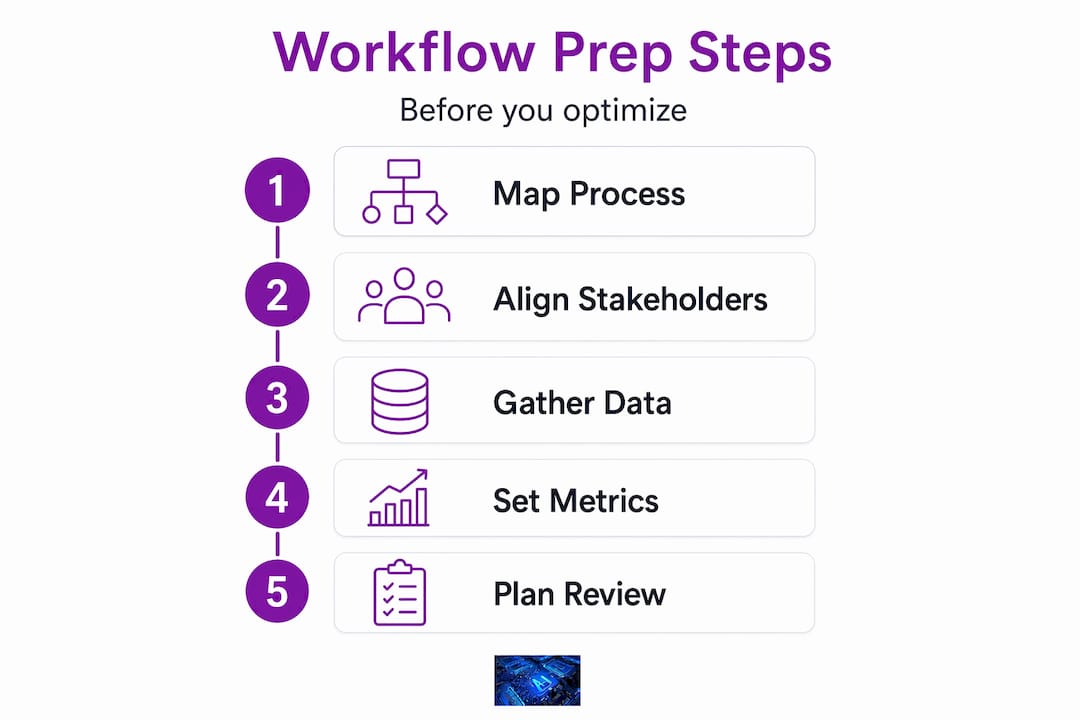
| Preparation element | Why it matters |
|---|---|
| Process map (BPMN or swimlane) | Shows the real flow, not the assumed one |
| Baseline metric collection | Gives you a number to beat and evidence of improvement |
| Stakeholder alignment | Prevents resistance during the Improve phase |
| Tool inventory | Identifies existing systems and integration gaps |
Executing DMAIC for workflow optimization
The DMAIC methodology (Define, Measure, Analyze, Improve, Control) is the most proven framework for disciplined workflow improvement in operational settings. It is structured, repeatable, and built around data rather than assumptions. Here is how to execute each phase with precision.
-
Define. Identify the problem clearly and scope the project before touching anything else. Write a problem statement that includes the process affected, the metric that is off target, and the business impact. Define your Critical to Quality (CTQ) requirements: what does the customer or end user actually need from this process? Keep the scope tight. Projects that try to fix ten things at once fix none of them.
-
Measure. Collect reliable baseline data on the process you defined. Build a detailed process map if you have not already, and validate it by walking the process yourself or with the team that runs it. Measure cycle time, error rates, and wait times at each step. Bad data in this phase produces misleading analysis in the next one.
-
Analyze. This phase typically lasts two to four weeks and is where most teams discover that the symptoms they complained about are not the actual root causes. Use tools like the 5 Whys, fishbone diagrams, and Pareto analysis to separate cause from effect. Focus your analysis on the data you collected, not on opinions about what the problem probably is.
-
Improve. Develop specific solutions to the verified root causes. Do not roll out changes organization-wide immediately. Pilot the solution with one team or one process lane first, measure the result against your baseline, and adjust before scaling. Build a risk mitigation plan that accounts for what happens if the new process fails mid-execution.
-
Control. This is the phase most teams skip, and it is the reason improvement gains disappear. Assign explicit ownership of the new process to a named individual. Create control charts or monitoring dashboards that trigger a review if performance dips below a defined threshold. Document the new standard operating procedure and train everyone who touches the process.
Pro Tip: Run a 30-day post-implementation check before closing the project. Teams often catch small compliance gaps in the first month that, left alone, quietly revert the process back to its old state.
| DMAIC phase | Common failure point | Corrective action |
|---|---|---|
| Define | Scope too broad | Limit to one process, one metric |
| Measure | Unreliable data sources | Validate data with direct observation |
| Analyze | Jumping to solutions early | Use root cause tools before proposing fixes |
| Improve | No pilot before full rollout | Test with one team, measure, then scale |
| Control | No assigned process owner | Name an owner, build a monitoring trigger |

Integrating AI and automation into optimized workflows
Once your process is documented, measured, and improved, you are ready to evaluate automation. Not before. Automating an inefficient process does not speed it up. It produces errors and waste at a faster rate, which costs more to fix than the original problem.
With a clean, standardized workflow in place, look for tasks that meet these criteria for automation readiness:
- High volume and low variation (the task runs the same way every time)
- Rule-based decisions with clear if/then logic
- Data entry or data transfer between systems with no judgment required
- Repetitive approval routing that follows a fixed pattern
AI tools add the most value in workflows where pattern recognition matters. Intelligent document processing can extract data from invoices and contracts with accuracy that manual entry cannot match at scale. AI scheduling systems handle appointment routing across teams without human coordination. Workflow monitoring tools flag anomalies in process performance before they become problems.
The business case for automation is well established. Workflow automation delivers 248% ROI over three years according to recent studies. That number only holds when the underlying process is sound. The risk is that 72% of organizations were using AI in at least one business function by 2026, and most of those deployments were fragmented rather than integrated into a coherent architecture. Fragmented automation creates new handoff problems. Integrated automation, built on verified process models, reduces them.
When you are evaluating tools, prioritize those that connect to your existing systems through documented APIs, produce audit logs, and can be monitored with the same control mechanisms you built in your DMAIC Control phase. For deeper context on building high-efficiency AI workflows, the Starksglobalgroup resource library covers implementation patterns that translate directly to operational settings.
Common pitfalls and how to avoid them
Even well-run optimization projects hit predictable obstacles. Knowing them in advance gives you a chance to address them before they derail your results.
The most common mistake is skipping phases. Teams under deadline pressure often jump from Define straight to Improve, cutting the Measure and Analyze phases because they feel like delays. The result is solutions that address the wrong problem. The time you think you are saving gets spent three months later when the issue resurfaces.
A second common failure is overengineering the solution. The best workflow improvement is usually the simplest one that eliminates the root cause. Complex redesigns introduce new points of failure and are harder to train teams on. Overlap scheduling alone can reduce cycle time by 40 to 60 percent in high-volume workflows. You do not always need a sophisticated new system. Sometimes you need a better sequence.
User resistance is real and underestimated.
Teams do not resist change because they are difficult. They resist it because no one explained why the current process is a problem or what the new one asks of them specifically.
Build communication into your project plan, not as an afterthought. Show the team the data. Explain what will change and what will not. Assign a process champion who is respected by the people running the workflow daily.
Pro Tip: Document your control plan in plain language, not in Six Sigma jargon. If the person owning the process cannot read the control chart and know what to do, the chart will not get used.
Watch for these early warning signs that your gains are eroding:
- Cycle time creeping back toward the pre-project baseline
- Informal workarounds reappearing in the process
- Process owners unable to explain the current standard
- Monitoring dashboards going unchecked for more than two weeks
Measuring success after optimization
The work is not finished when the project closes. Verified improvement requires a measurement system that runs continuously, not just a one-time post-project review.
| KPI | What it tells you | Review frequency |
|---|---|---|
| Cycle time | Speed of end-to-end process completion | Weekly |
| Defect or error rate | Quality of process outputs | Weekly |
| Throughput | Volume capacity relative to demand | Monthly |
| Cost per transaction | Efficiency of resource use per unit | Monthly |
| Employee satisfaction score | Adoption and morale impact of new process | Quarterly |
Connect your KPIs to a dashboard your process owner checks on a fixed schedule. Control charts work well here because they show both average performance and variation, which is where most process problems actually live. When a metric goes outside its control limit, that is your trigger to investigate immediately rather than wait for the next quarterly review.
Sustained improvement also depends on building feedback loops. Schedule a formal process review every 90 days in the first year. Use that review to ask whether the process has drifted, whether the business need has changed, and whether there are new automation opportunities that were not viable when the project started.
My honest take on workflow optimization
I have watched operations teams put serious effort into optimization projects and still end up back where they started within a year. Not because the methodology failed. Because the project ended and the ownership disappeared with it.
The data is unambiguous. Sustained workflow improvement depends on explicit ownership, monitoring, and continuous process control. That is not a suggestion. It is the difference between a project and a system.
What I have found is that the teams with lasting results treat the Control phase with the same rigor as the Improve phase. They name a process owner before the project closes. They build a monitoring trigger that does not require anyone to remember to check. They make improvement a structural habit, not a one-time initiative.
On the AI side, the organizations that see the best returns are the ones that deploy automation after cleaning up their processes, not as a shortcut to avoid doing that work. Layering AI onto a verified, standardized workflow produces consistent, scalable output. Layering it onto a chaotic process just produces faster chaos.
My take: the workflow optimization process is not complicated, but it requires discipline. Invest in the preparation, execute the phases in order, and build control mechanisms with real teeth. The results will hold.
— Tyler
Take your workflow optimization further with AI systems
If you have completed your optimization groundwork and want to know how AI infrastructure can accelerate what comes next, Starksglobalgroup has built the blueprints for exactly that.

Our AI Automation Agency System provides a complete architecture for deploying workflow automation across client or internal operations, from tool selection through deployment logic. For teams focused on scaling pipeline operations, the Appointment Setter Empire System delivers a verified automation stack built specifically for high-volume scheduling workflows. Both systems are tested, documented, and designed to plug into processes you have already optimized. You can also explore how enterprise AI automation scales across operational layers in the Starksglobalgroup blog.
FAQ
What is the workflow optimization process?
The workflow optimization process is a structured method for analyzing, improving, and controlling how work moves through an organization. It typically uses a framework like DMAIC to identify inefficiencies, address root causes with evidence-based solutions, and sustain gains through monitoring and ownership.
How do I know which workflows to optimize first?
Prioritize workflows with the highest cycle time, error rate, or cost per transaction. Processes that touch the most people or directly affect customer output typically deliver the largest return when improved.
When should I introduce automation into a workflow?
Introduce automation after a workflow has been documented, measured, and simplified. Automating a broken process amplifies errors rather than removing them. Automation works best on rule-based, high-volume tasks within a standardized process.
What causes workflow optimization projects to fail?
The most common causes are skipping the Measure and Analyze phases, failing to assign process ownership in the Control phase, and underestimating user resistance. Without a control plan, improvement gains typically erode within six months.
What metrics should I track after optimization?
Track cycle time, error rate, throughput, and cost per transaction on a weekly or monthly basis. Use control charts to detect variation early and schedule formal process reviews every 90 days in the first year post-implementation.