

Manual workflows carry a hidden operational tax. Tasks that should take seconds consume minutes, errors compound across handoffs, and your teams spend more time coordinating than executing. One controlled case study recorded an average manual execution time of 185.35 seconds versus 1.23 seconds when automated, roughly a 151x reduction in cycle time with a lower observed error rate. This guide walks you through exactly how to redesign, automate, and validate your operational workflows so you can move from fragile manual processes to structured, scalable AI-driven systems.
Table of Contents
- Understand the operational efficiency workflow landscape
- Step-by-step workflow redesign for scalable AI automation
- Design for reliability: Handling workflow failures and edge cases
- Validate operational gains: Measuring speed, quality, and resilience
- Efficiency vs resilience: Avoiding the efficiency trap
- Our perspective: Why workflow redesign beats incremental automation
- Take action: Upgrade your operational efficiency workflow
- Frequently asked questions
Key Takeaways
| Point | Details |
|---|---|
| AI workflows reduce costs | Automating end-to-end workflows with AI minimizes handoffs and coordination expenses. |
| Massive speed gains | Benchmarks show 151x faster execution times and lower error rates versus manual processes. |
| Reliability is essential | Resilient workflow automation requires handling edge cases, retries, and state consistency. |
| Balance efficiency with resilience | Avoid removing all operational slack—over-optimization can increase fragility. |
| Measure and validate ROI | Track cycle time, errors, and system resilience to quantify workflow automation benefits. |
Understand the operational efficiency workflow landscape
Operational efficiency, in an AI automation context, means completing the right work at the lowest possible cost in time, coordination, and resources. It's not just about speed. It's about removing structural friction from the way work flows through your organization.
Most businesses have workflows that look functional on paper but break down under volume. Common structural problems include:
- Handoff delays: Work pauses while one team waits for input from another.
- Coordination overhead: Meetings, status checks, and approvals consume more time than the work itself.
- Isolated automation: Individual tools are automated independently, but the gaps between them remain manual.
- Inconsistent execution: Different team members follow slightly different processes, creating variable output quality.
These bottlenecks are not random. They are structural. The path to fixing them is not to plug AI into existing broken processes but to redesign how work is structured from the start. Explore structured automation tips to see how a structural redesign approach compares to tool-by-tool automation.
A key insight from MIT Sloan is that end-to-end task chaining reduces handoffs and coordination costs far more effectively than using AI for isolated steps. This distinction matters enormously. When AI handles a full contiguous sequence of tasks rather than one step in a long manual chain, the compounding efficiency gains become significant.
Here is a direct comparison between the two approaches:
| Dimension | Isolated AI automation | End-to-end AI workflow |
|---|---|---|
| Handoff frequency | High | Low |
| Coordination cost | High | Low |
| Error accumulation | Moderate to high | Low |
| Scalability | Limited | High |
| Implementation complexity | Lower upfront | Higher upfront, lower long-term |
| Resilience to volume spikes | Poor | Strong |
The table makes the case clearly. End-to-end workflow design requires more upfront structural work, but the returns in scalability, quality, and resilience are substantially greater. Reviewing AI system design strategies will give you the architectural foundation to approach this correctly. For businesses evaluating where to start, AI services for business provides a practical overview of capability categories.
Step-by-step workflow redesign for scalable AI automation
A practical workflow redesign pattern involves identifying the full end-to-end process, clustering AI-compatible tasks to minimize handoffs, and implementing orchestration with explicit human-in-the-loop points for high-stakes decisions. Here is how to execute that pattern.

Step 1: Map the full process from start to finish
Document every step, decision point, and handoff in your current workflow. Use a simple process map or flowchart. The goal is visibility, not polish. You need to see where delays accumulate and where human judgment is genuinely required versus where it is habitual.
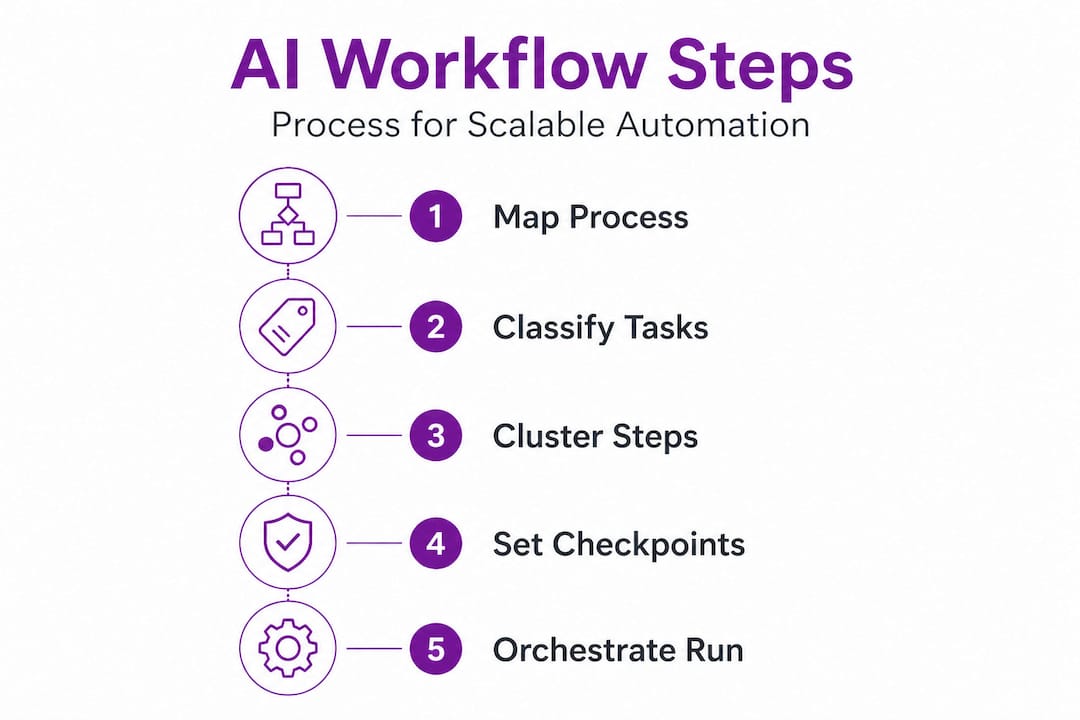
Step 2: Classify each task by automation compatibility
Not every task is immediately ready for AI execution. Sort tasks into three groups: fully automatable, automatable with oversight, and human-required. Tasks involving structured data transformation, routing decisions based on defined rules, or repetitive output generation are almost always automatable. Tasks requiring ethical judgment, legal review, or novel problem-solving typically require human involvement.
Step 3: Cluster AI-compatible tasks into contiguous sequences
Rather than automating individual tasks in isolation, group adjacent automatable tasks into continuous execution blocks. This is the structural move that delivers the most value. Each cluster runs as a single coordinated workflow rather than a series of disconnected automations.
Step 4: Insert human-in-the-loop checkpoints deliberately
Human review should be placed at specific, defined decision gates: before irreversible actions, at quality thresholds, and at points where regulatory or ethical requirements apply. Keep these checkpoints minimal and purposeful. Excessive human review negates the gains from automation. For more on building this architecture into enterprise AI automation, see our detailed breakdown.
Step 5: Build the orchestration layer
The orchestration layer is the coordination infrastructure that sequences tasks, passes data between them, and manages execution state. This is where workflow design becomes workflow engineering. Understanding automation system components gives you the vocabulary and structure to build this correctly.
Step 6: Run a pilot with measurable benchmarks
Before full deployment, run the redesigned workflow against a controlled sample. Measure cycle time, error rate, and output consistency. Compare directly to your manual baseline. This is not optional. It's your evidence layer.
Pro Tip: Start with your highest-volume, most repetitive workflow. The returns are faster to materialize and easier to measure, which builds organizational confidence for broader automation rollout.
Here is a benchmark reference for what controlled measurement looks like in practice:
| Metric | Manual baseline | Automated result | Change |
|---|---|---|---|
| Average execution time | 185.35 seconds | 1.23 seconds | 151x faster |
| Observed error rate | Moderate | Near zero | Significant drop |
| Scalability at 10x volume | Fails | Stable | High resilience |
For context on end-to-end development benefits, including how contiguous design reduces failure surfaces, the linked resource covers the engineering rationale in practical terms.
Design for reliability: Handling workflow failures and edge cases
Once your workflow is redesigned and mapped, the next engineering priority is reliability. Automated workflows that are not designed for failure will eventually break in production, often in ways that are harder to debug than manual processes.
Common failure modes in production workflows include:
- Retries creating duplicates: A failed task is retried, but the original action already partially completed, resulting in duplicate records or charges.
- Partial execution leaving inconsistent state: One step succeeds and the next fails, leaving data in a broken intermediate state.
- Cascading failures under concurrency: High task volume causes race conditions where multiple workflow instances interfere with each other.
- Missing audit trails: No record of what executed, when, and with what inputs, making debugging nearly impossible.
"Retries can turn a single failure into a cascade. Design for bounded attempts and state checks."
The failure prevention checklist outlines how idempotency, bounded retries, and compensation strategies are essential for protecting production workflows. Idempotency means a task can be safely executed multiple times without producing different outcomes. Bounded retries means setting a hard limit on how many times a failed step is reattempted before escalation. Compensation strategies mean having a defined rollback path when a workflow cannot complete successfully.
Practical reliability design patterns:
- Idempotency keys: Assign a unique identifier to each workflow execution so duplicate calls are rejected rather than double-processed.
- Execution ledger: Log every step, its input, output, and status so recovery can resume from the last verified checkpoint rather than restarting from zero.
- Timeout and circuit breakers: Set maximum execution windows per task and stop cascading calls to a failing dependency automatically.
- Compensation logic: Define what reversal actions occur when a workflow fails mid-sequence, particularly for financial or data-modification operations.
Pro Tip: Always test your automation with production-like data volume and variety, and simulate failure conditions explicitly before deployment. Failure modes that only appear under real-world conditions are the most damaging to discover post-launch.
Review our infrastructure automation best practices and scalable automation for midsize resources for architecture-level guidance on building these reliability layers into your systems.
Validate operational gains: Measuring speed, quality, and resilience
With reliability built in, measurement becomes your proof layer. Workflow automation that is not measured is not managed. You need a consistent framework for evaluating whether your redesigned workflow is delivering on its operational promises.
Core metrics to track across all automated workflows:
- Cycle time: Total elapsed time from workflow trigger to completion. Compare directly to your manual baseline.
- Error rate: Percentage of executions that produce incorrect, incomplete, or rejected outputs. Track this across both normal conditions and edge cases.
- Throughput: How many workflow instances can execute within a defined time window without degradation.
- Resilience score: How the workflow performs under failure conditions, high volume, and edge case inputs.
The 151x cycle time reduction documented in controlled benchmarks is striking, but the operational lesson is not simply that automation is faster. It is that controlled measurement with manual versus automated comparisons gives you defensible evidence to support further investment and to identify where your automation is underperforming.
One critical measurement mistake is tracking only efficiency metrics and ignoring resilience. A workflow that completes 99% of tasks 151x faster but fails catastrophically on 1% of edge cases has a serious operational liability. Resilience metrics must sit alongside speed and quality in your measurement framework. Use our top automation tool comparisons to evaluate which tooling delivers verified performance across all three metric categories.
Efficiency vs resilience: Avoiding the efficiency trap
There is a strategic risk that emerges when organizations focus exclusively on efficiency optimization. Removing all operational slack, redundancy, and buffer capacity can create a system that performs beautifully under normal conditions and breaks severely under stress.
"Efficiency breakthroughs can paradoxically create fragility by eliminating operational buffers."
Efficiency optimization without resilience can increase fragility by stripping out the redundancy and slack that act as shock absorbers in real-world operations. This is the efficiency trap: the more tightly optimized a system becomes, the less capacity it has to absorb unexpected load, data anomalies, or infrastructure failures.
Practical design principles to avoid the efficiency trap:
- Maintain buffer capacity: Keep some processing headroom in your automation infrastructure so volume spikes do not immediately degrade performance.
- Preserve redundant paths: For critical workflow steps, have a fallback execution route in case the primary path fails.
- Design recovery procedures: Know exactly what happens when a workflow fails at each stage and how your team responds.
- Avoid single points of failure: Do not build a workflow where one tool or API failure takes down the entire process.
The goal is not maximum efficiency in isolation. The goal is a system that achieves high efficiency and maintains structural integrity under adversarial conditions. Review automation system fundamentals for a grounded framework on building systems that balance both dimensions.
Our perspective: Why workflow redesign beats incremental automation
We have seen a consistent pattern across organizations that pursue automation. Those that add AI tools to existing workflows get modest gains. Those that redesign how work is structured before deploying AI get transformational results. The difference is architectural, not technological.
Treating AI as a plug-in to an existing workflow preserves the same handoffs, coordination costs, and structural inefficiencies. You get a faster individual step inside a slow system. End-to-end redesign eliminates the slow system itself.
Most organizations also underinvest in orchestration. They spend significant resources selecting and configuring AI tools, then build the weakest possible connection layer between them. Orchestration is not a secondary concern. It is the foundation that determines whether your automation scales or collapses under production load.
Edge cases are not an afterthought. They are where workflow quality is defined. The workflows that deliver consistent, trustworthy output are the ones designed with failure modes mapped out before deployment, not patched after incidents. We recommend reviewing streamlining operations with AI for practical implementation patterns that build this rigor into your process from day one.
Our position is direct: invest heavily in workflow structure, orchestration design, and reliability engineering before you scale. Those foundations determine whether your automation compounds in value or accumulates technical debt.
Take action: Upgrade your operational efficiency workflow
If this guide clarified what it takes to build workflows that actually scale, the next step is applying these principles with verified tools and tested architectures. Starks Global Group provides the infrastructure blueprints and system designs that turn this framework into deployed reality.

Explore the automation infrastructure platform to see how layered automation architectures are structured for real-world deployment. Browse the tools and systems marketplace to find verified tools that have been tested for production use cases. If you're building AI-driven sales workflows specifically, the AI chatbot sales blueprint provides a detailed architecture for that use case. Every resource we publish is grounded in the same engineering principles covered in this guide: structured design, validated performance, and operational resilience.
Frequently asked questions
What are the main benefits of automating workflows using AI?
AI-driven automation reduces execution time, lowers error rates, and cuts coordination costs. One benchmark documented a 151x cycle time reduction with near-zero observed errors compared to manual execution.
How do I ensure my automated workflows are reliable in production?
Reliable workflows require idempotency keys, bounded retry logic, and a compensation strategy for partial failures. Production failures most commonly result from missing these design elements, not from tool limitations.
Why is end-to-end workflow automation preferable to piecemeal approaches?
End-to-end automation eliminates the coordination overhead and handoff delays that piecemeal approaches leave intact. Task chaining across full sequences delivers compounding efficiency gains that isolated automations cannot match.
What is the "efficiency trap" in operational workflow design?
The efficiency trap occurs when removing all redundancy and buffer capacity creates a system that is highly efficient under normal load but fragile under stress. Optimizing only for efficiency eliminates the operational slack that protects against unexpected failures.
How should I measure the impact of workflow automation?
Track cycle time, error rate, and resilience metrics against a documented manual baseline. Controlled measurement comparing manual and automated outcomes provides the defensible evidence needed to guide further investment decisions.